Argent MCP Server, CLI and SDK: Which One Should You Use?
 Błażej Kustra 10 min read
You probably use Argent through its MCP server: one prompt, and Claude Code or Cursor taps through your app. Some jobs don’t need an agent at all: a CI step that replays your recorded tests, a shell script that resets the simulator before a demo, or a tool like Goldie, our App Store screenshot generator, which drives Argent straight from TypeScript. I work on Argent at Software Mansion. Below you’ll find what the Argent MCP server, CLI and SDK each do, the commands to get started with each, and a short chart for picking the right one.
What is in the Argent family?
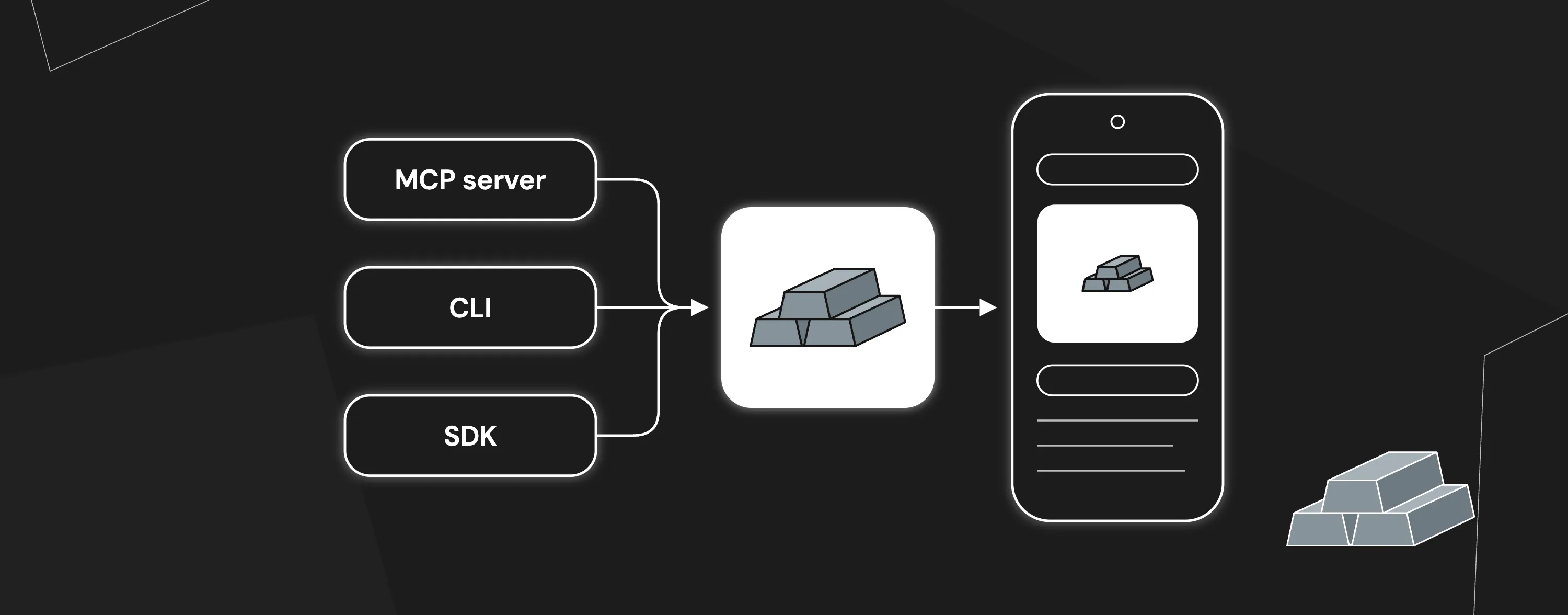
Argent ships as one npm package @swmansion/argent with three ways to reach the same device tools:
- The MCP server (
argent mcp) is for AI coding agents. The Model Context Protocol (MCP) is the standard that Claude Code, Cursor, Codex CLI, Gemini CLI and other agents use to call external tools. - The CLI (
argent) is for you, your shell scripts and your CI jobs. - The SDK (
@swmansion/argent/client) is for your own Node.js code.
If you are new to Argent itself, the Meet Argent post covers what the toolkit can do.
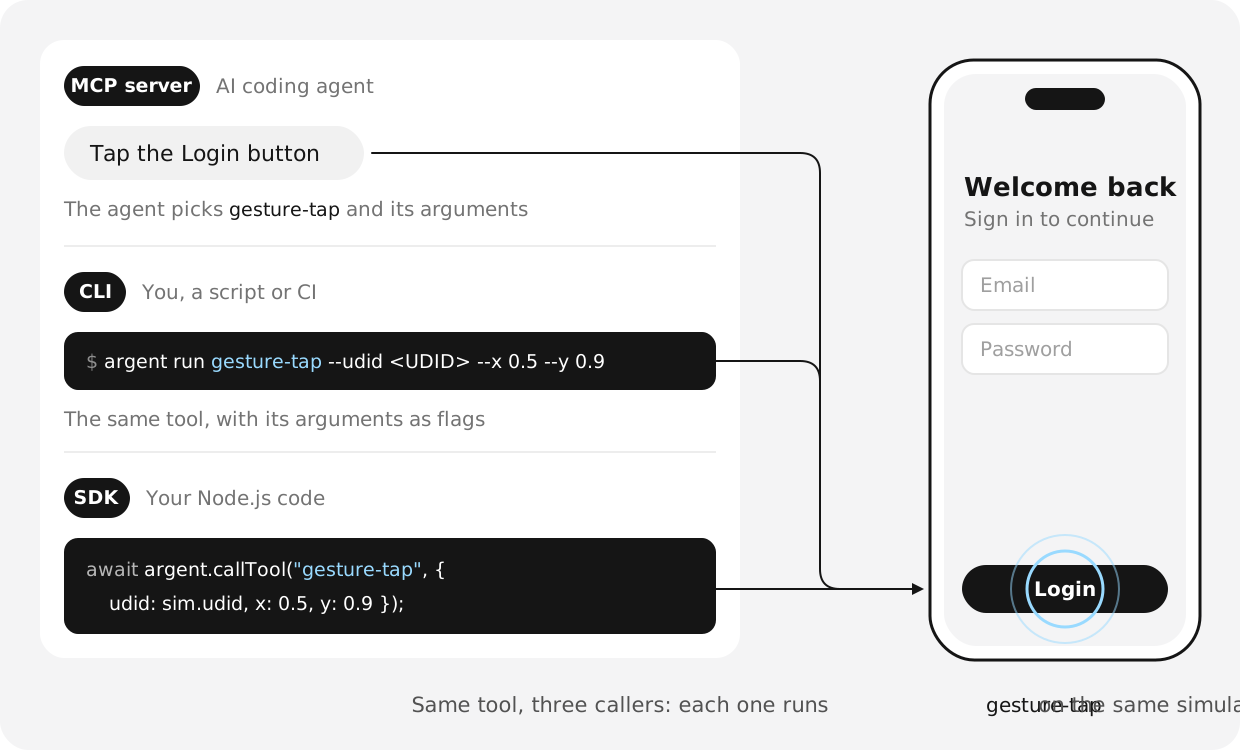
All three expose the same tools. Here is one tap on a Login button, done from each of them:
Why do the MCP server, CLI and SDK share the same tools?
All three talk to one background process, the Argent tool-server, which owns the devices and runs every tool.
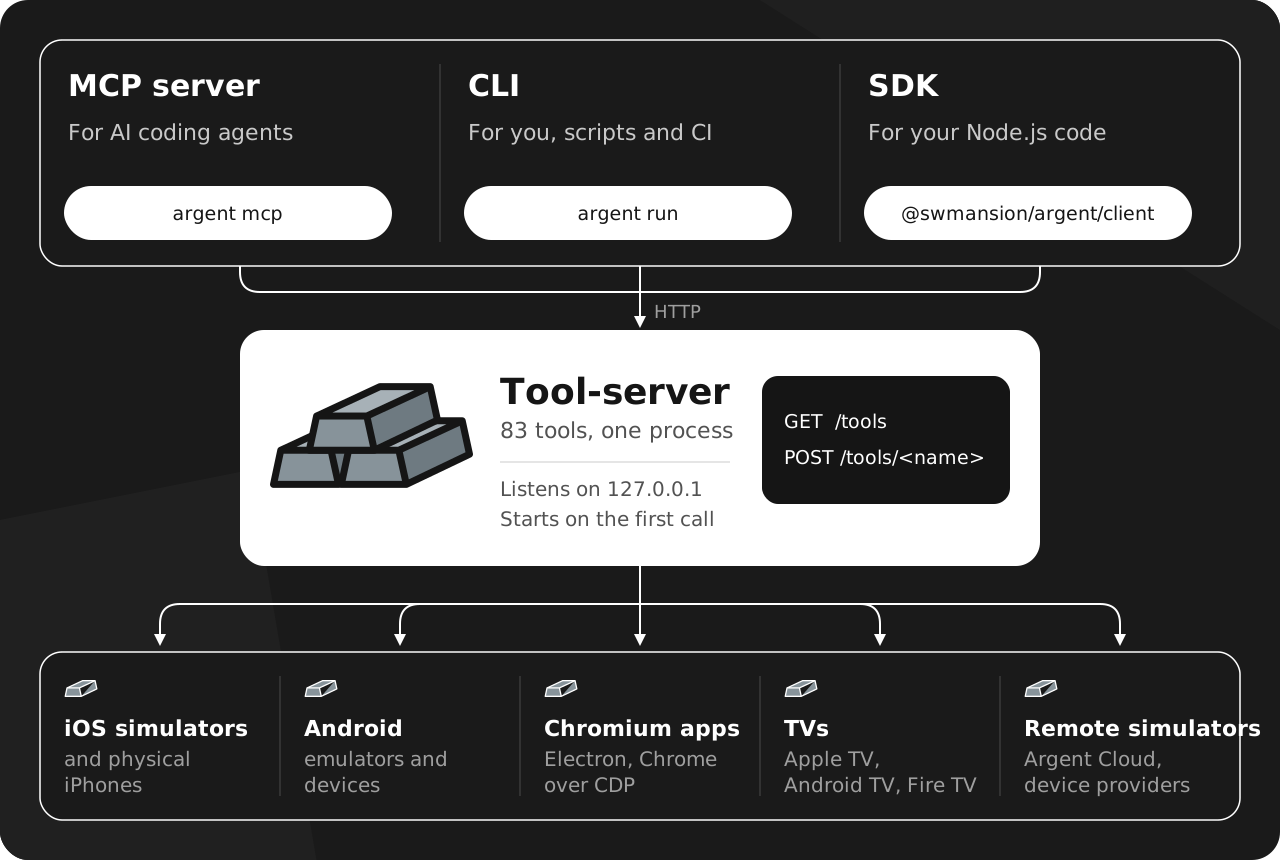
Under the hood it is a small HTTP server on 127.0.0.1: GET /tools lists the tools with their JSON schemas, and POST /tools/<name> calls one. It starts on the first call if none is running:
$ argent server status
tool-server:
  url:        http://127.0.0.1:49420
  health:     ok
This design has three practical consequences:
- One tool list everywhere. A new tool appears in all three clients at once. In Argent 0.30.1, the SDK’s
listTools()returns 83 tools. - Shared devices. Every agent and script on the same Argent install talks to the same tool-server, so a simulator your agent booted is already there for your script.
- One switch for remote work.
argent linkor theARGENT_TOOLS_URLvariable points all three clients at a tool-server on another machine.
How do I set up the Argent MCP server?
Run the installation wizard:
npx @swmansion/argent@latest initThe wizard installs Argent, detects your editor, registers the MCP server and adds Argent’s skills. Add --local to pin Argent in your project’s devDependencies so the whole team runs the same version. The MCP server docs cover manual setup for each editor.
Then talk to your agent in plain language: “Boot an iOS simulator and launch my app”, or “Tap through the sign up flow and tell me where it breaks”. The agent loop case study shows what that looks like on a real app.
What does the MCP server add on top of the tools?
After an interaction tool, such as a tap, a swipe, typing, an app launch or a run-sequence, the MCP server waits for the screen to settle and attaches the accessibility element tree (every button, field and label on screen, with its position) to the result. The agent knows where to tap next without asking for the screen layout again. We measured the element tree on Sonnet over 70 runs: 21% fewer turns, 23% less wall time and 17% lower cost at equal task success (PR #958).
The setup wizard also installs Argent’s skills: 18 short playbooks the agent loads when a task matches, such as setting up an iOS simulator, recording an e2e test or profiling a React Native app. They give the agent tested step-by-step instructions, so it reaches a working result in fewer turns.
The CLI and the SDK return only the tool’s own result, so your script decides when to read the screen or take a screenshot.
How do I use the Argent CLI?
The argent command comes with the global install, or with npm install -g @swmansion/argent if you skipped the wizard. argent run turns each tool’s JSON schema into flags, so every tool the agent can call is one command away:
argent tools                          # list every tool
argent run gesture-tap --help         # one tool's arguments as flags
argent run list-devices --json
argent run screenshot --udid <UDID>
argent run gesture-tap --udid <UDID> --x 0.5 --y 0.9
argent run await-ui-element --udid <UDID> --condition visible \
  --selector-json '{"text":"Sign in"}'
Coordinates are fractions of the screen from 0 to 1, and --json prints the raw result for scripts.
The CLI also replays Argent e2e tests without an LLM in the loop. An e2e test is a YAML file of steps that the agent records while it works through your app:
argent e2e run checkout          # runs .argent/e2e/checkout.yaml
argent e2e run .argent/e2e       # runs every test in the directory
Ask the agent to record an e2e test once, and a CI job replays it on every branch with no model and no tokens. The e2e docs cover recording and the YAML format.
How do I use the Argent SDK?
The Argent SDK calls Argent tools from your own program. Node.js is supported today, through the @swmansion/argent/client module that ships inside the main package since version 0.27.0:
npm install --save-dev @swmansion/argentHere is a small smoke check. It finds a booted iOS simulator, launches an app, waits for the login screen and saves a screenshot:
import { createArgentClient } from "@swmansion/argent/client";

// Starts the tool-server on the first call if it is not running
const argent = createArgentClient();

// Pick the first booted iOS simulator
const { data: list } = await argent.callTool("list-devices");
const sim = list.devices.find((d) => d.platform === "ios" && d.state === "Booted");

// Open the app under test
await argent.callTool("launch-app", { udid: sim.udid, bundleId: "com.example.myapp" });

// Wait up to 3 s for the "Sign in" text to show up
const { data: wait } = await argent.callTool("await-ui-element", {
  udid: sim.udid,
  condition: "visible",
  selector: { text: "Sign in" },
  timeoutMs: 3000,
});

// Save a screenshot; shot.image is a local file path
const { data: shot } = await argent.callTool("screenshot", { udid: sim.udid });
console.log(wait.success ? "Login screen is up" : "Login screen missing", shot.image);
callTool returns { data, note? }, with screenshots and recordings as local file paths. The client ships types for every tool, so TypeScript rejects an unknown tool name or arguments that miss the schema. A failed call throws ArgentToolError with a code, a kind and, for bad arguments, the schema issues. A tap at x: 2 fails that way and never reaches the screen. Long calls accept an AbortSignal and an onProgress callback, and stopServer() and listFlags() mirror argent server stop and argent flags.
A few tools are hidden from the MCP server because they are built for code. The SDK and argent run can call them:
| Tool | What it does |
|---|---|
ui-tree | Returns the raw accessibility tree as nested JSON |
foreground-app | Returns the app in front, for example { bundleId, name, alertVisible } |
fill | Sets the focused text field to exactly the given text |
terminate-app | Stops a running app without relaunching it |
The Argent SDK reference lists the full API.
What is the difference between Argent MCP, CLI and SDK?
All three expose the same tools. They differ in who calls them and in what comes back.
| MCP server | CLI | SDK | |
|---|---|---|---|
| Who calls it | An AI agent | You, a shell script, a CI job | Your Node.js program |
| Setup | npx @swmansion/argent@latest init | Global install from init | npm install --save-dev @swmansion/argent |
| A tool call | The agent picks the tool and arguments | argent run <tool> with flags | argent.callTool(name, args) |
| What comes back | Result, plus the element tree after interaction tools | Text, or JSON with --json | { data, note } with typed names and arguments |
| Best for | Building, debugging and verifying with an agent | Trying tools by hand, replaying e2e tests in CI | Custom test runners, harnesses and internal tools |
Which one should you use?
It depends on who calls Argent. Use the MCP server when an AI agent does the work, the CLI when you or a shell script do, and the SDK when your own Node.js program does.
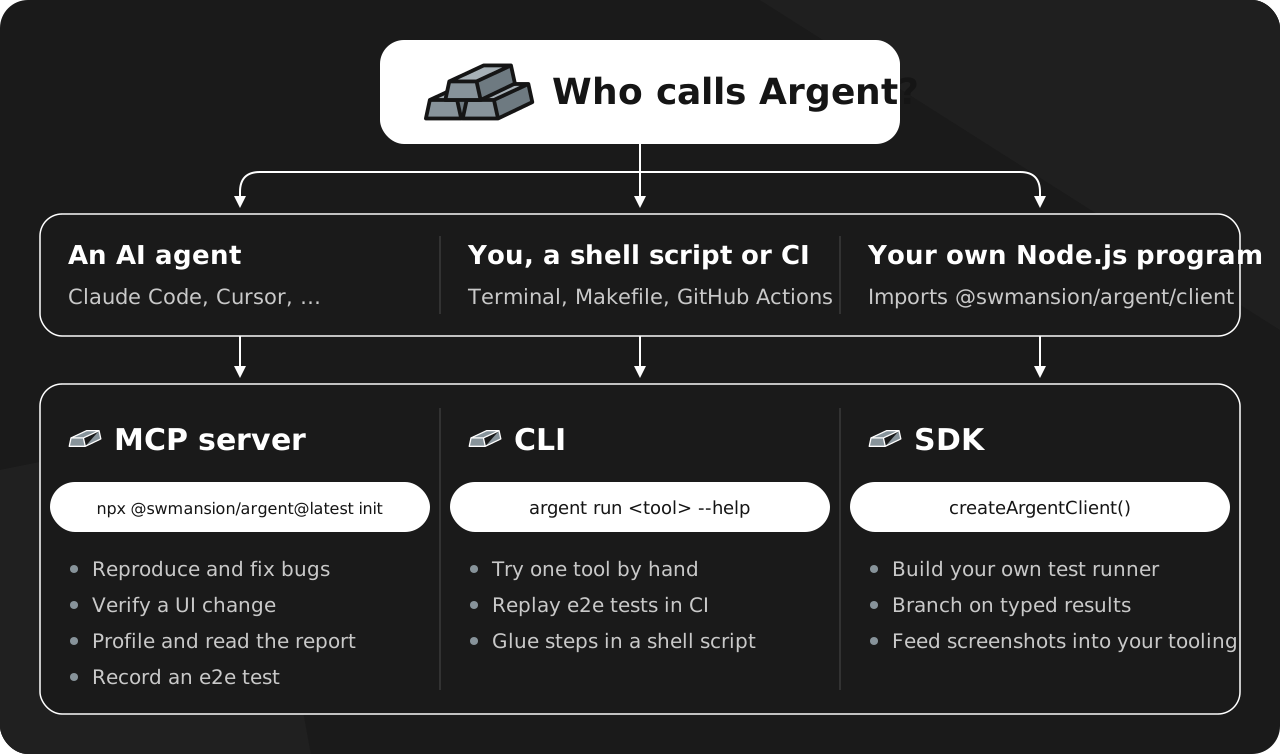
A few rules of thumb:
- Start with the MCP server if you are new to Argent. It is what
initsets up, and the skills teach the agent how to use the tools well. - Move to the CLI once a step should run the same way every time, such as a smoke test in CI.
- Choose the SDK when you need logic between calls: loops, branching on the UI tree, comparing builds, or plugging Argent into your own agent harness. For a fixed sequence, a shell script around
argent runis often enough.
Can I use the MCP server, CLI and SDK together?
Yes, and the shared tool-server makes it easy. The agent reproduces a bug through the MCP server and records the path as an e2e test. CI replays that test with argent e2e run on every pull request. A small SDK script checks a few screens across two builds and saves the screenshots for review.
Sharing has one sharp edge. A cleanup in one client affects the others: stopServer() and argent server stop stop the tool-server for everyone on that install. When you stop devices with stop-all-simulator-servers, name the devices you used so other sessions keep theirs.
Key takeaways
- The Argent MCP server, CLI and SDK are three clients over one tool-server, so they share every tool and every running device.
- Use the MCP server when an agent drives. It adds the element tree after interaction tools.
- Use the CLI to try a tool by hand, script a fixed sequence or replay e2e tests in CI.
- Use the SDK when your Node.js code needs typed calls, real errors and the tools hidden from MCP.
FAQ
Is the Argent SDK a separate package?
The SDK is the @swmansion/argent/client module inside the main @swmansion/argent package, which also provides the MCP server and the CLI. Installing Argent once gives you all three.
Can my agent use the CLI instead of the MCP server?
Yes. An agent with shell access can call argent run and reach the same tools. It receives the raw result, without the element tree that the MCP server attaches after interaction tools.
Does the SDK work with Argent Cloud?
Yes. The Argent Cloud integration lives in the tool-server, so the SDK sees the same devices as the agent. Once sim-remote is installed and logged in, hosted iOS simulators from Argent Cloud appear in list-devices with a remote: prefix.
.BpZvBE26_IntGg.webp)